modenaf360/youtube-dl-nas
Authenticated yt-dlp queue with mobile sharing, history, and NAS file management.
5M+
modenaf360/youtube-dl-nas repository overview
youtube-dl-nas




An authenticated, NAS-friendly yt-dlp download queue for video, audio, and subtitles. Run it on Synology, another NAS, or any Docker host and manage downloads from a responsive web dashboard.
Current release: 26.1105 · Architectures: linux/amd64, linux/arm64
New in this release: a full-width library with on-demand details, local subtitle-content search with playable timestamps, and revocable read-only AI connections with optional collection scope. No LLM API key, database, or companion container is required. Keep both volumes when upgrading; existing mobile sharing and tokens continue to work.
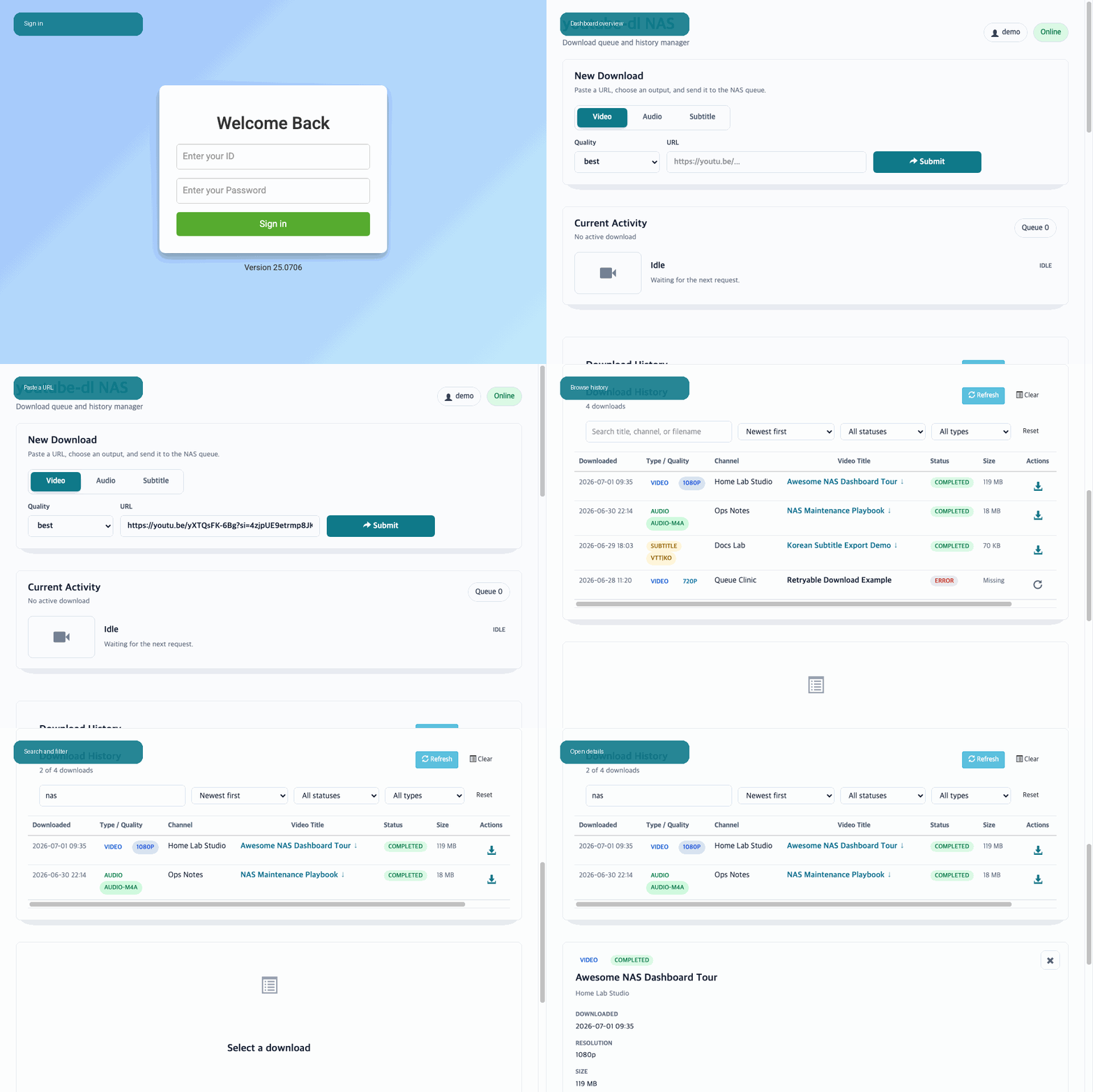
Captured from 26.1012 with synthetic demo media.
Quick Start
docker run -d \
  --name youtube-dl-nas \
  --restart unless-stopped \
  -e MY_ID=nas-user \
  -e MY_PW=change-this-password \
  -e TZ=Asia/Seoul \
  -v /volume2/youtube-dl:/downfolder \
  -v /volume2/docker/youtube-dl-nas:/usr/src/app/metadata \
  -p 8080:8080 \
  modenaf360/youtube-dl-nas:latest
Open http://YOUR_NAS:8080, sign in with MY_ID and MY_PW, accept the Terms of Use on first launch, and submit a URL.
The second volume is strongly recommended. It preserves the restart-safe queue, download history, terms acceptance, and signed-session state across container recreation.
What You Get
- Video up to 2160p, an explicit H.264/AAC Compatible MP4 profile, audio-only M4A/MP3/Opus, and SRT/VTT subtitle downloads.
- English, Korean, Simplified Chinese, and Polish UI with automatic browser-language detection and a saved preference.
- Authenticated queue with live progress, transfer speed, ETA, and the ordered list of waiting jobs.
- Download-volume capacity status, a safe active-job stop control, retained partial data, and actionable failure guidance.
- Database-free queue recovery across container restarts, compatible partial-download continuation, duplicate guards, and removable waiting jobs.
- One-submit Smart Preflight with a three-second undo window, media-identity duplicate checks, and actionable Already on NAS receipts.
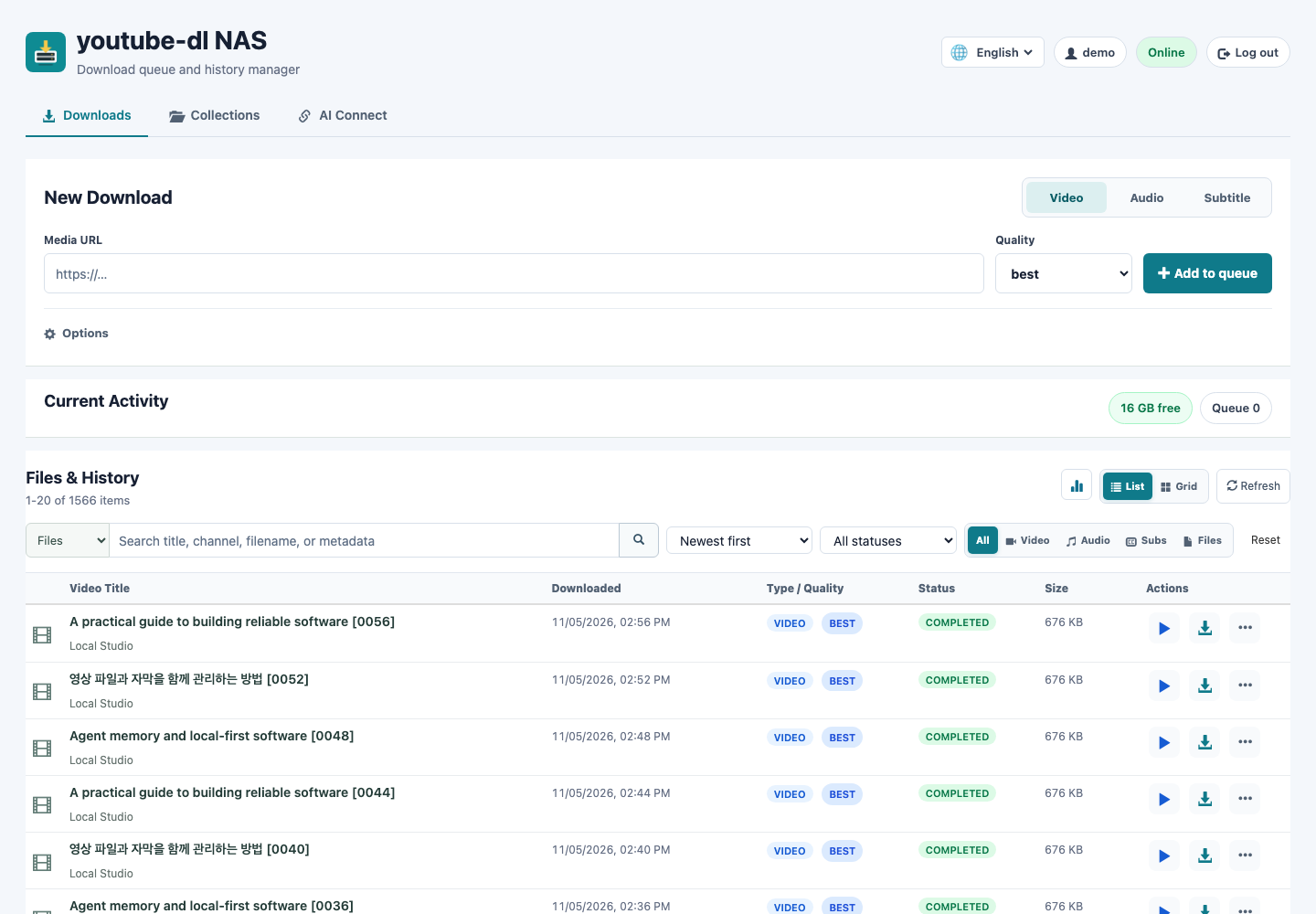
- Searchable download history with compact list and thumbnail grid views, filters, newest-first sorting, 20-item pages, and a lightweight library overview.
- Local SRT/VTT/ASS/SSA text search, bounded transcript reading, timed playback and related media/subtitle files.
- Read-only MCP connections for library search, optionally limited to one collection, with per-client token revocation.
- Mounted-file discovery for existing files in
/downfolder, including files without saved metadata. - Inline video/audio preview, retry, browser download, history-only delete, and physical-file delete actions.
- Subtitle QA for SRT/VTT/ASS/SSA files with
nlptuttiCER/WER/CRR metrics and keyword preservation. - Android PWA sharing, Android local-HTTP Shortcuts, and an installable iOS Shortcut.
- Per-device PWA share profiles, including Ask every time for review before queueing.
- Authenticated, size-bounded Netscape cookies management for restricted sources, while external mounted files remain read-only.
- Playlist Guard with explicit Current video, First 10, and All items scopes.
- Optional JPG thumbnail sidecars with local grid previews and sidecar-aware deletion.
- New-download naming: original title, channel + title, or request date + title, plus an optional custom title; IDs and extensions are retained.
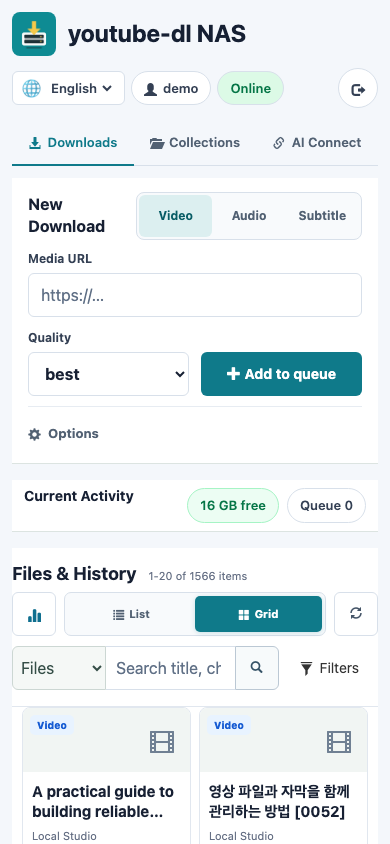
- Mobile search with collapsible filters and direct playback/download actions; named destructive actions live under More with confirmation.
- REST API with normal ID/password authentication and an optional Bearer token.
yt-dlp,yt-dlp-ejs, and Deno updates at startup and every hour by default.- Current
nlptuttiinstallation or upgrade whenever a new container starts. - Container health check plus PUID, PGID, and UMASK support.
Dashboard
Find A Phrase In Saved Subtitles
Choose Files & History → Subtitles, enter a word or phrase, and press Search. Select a timestamp for playback or Read transcript for context. Switch back to Files for filename/title search and normal library actions. Only saved subtitles are searchable; this does not transcribe videos or run an LLM.
In AI Connect, new tokens default to Search and read only. Choose the whole library or one collection, copy the one-time token into the client's private configuration, and ask it to find a phrase with file and time references. Collection access covers explicit members, including subtitles, not neighboring files automatically. Select Search and queue downloads only when needed. An authorized AI client can see the subtitle text it reads. Existing tokens keep their permissions. English/Korean dashboard guide
Search/read flows were tested with native Codex CLI and Claude Code against an isolated NAS container. This is not certification for ChatGPT web or every client.
MCP Collections
Release 26.0906 adds topic collections and AI Connect alongside the existing
Downloads screen. Preview researched direct URLs, check dates and duplicates,
and approve one idempotent batch. New media is grouped in safe nested collection
folders; existing files can be linked without copying or moving them.
Create and revoke named connection tokens from the dashboard. The official
Python MCP SDK runs in the normal container behind nginx at
/youtube-dl/mcp, sharing the existing external port and preserving WebSocket
and PWA routes. No companion image or MCP enable flag is required.
Follow the MCP guide and compatibility notes for client setup and the actual validation scope. Six native-client end-to-end certification is not claimed. Use HTTPS or a VPN for remote MCP access; bearer tokens are not encrypted by plain HTTP.
The 26.0906 Linux/AMD64 preflight measured about 157 MB total idle process RSS,
including the always-on MCP service. Allow additional memory for downloads and
Subtitle QA. The footprint review
documents the increase over 26.0830; it is not a claim that ARM64 or
download-time memory was measured. See the
26.0922 validation record
for the previous release's checks and native-client coverage.
26.1105 layout with synthetic media:
Persistent Paths
| Container path | Purpose |
|---|---|
/downfolder | Downloaded and pre-existing media files |
/usr/src/app/metadata | Restart-safe queue, history, terms acceptance, and session state |
Main Environment Variables
| Variable | Required | Default | Purpose |
|---|---|---|---|
MY_ID | Yes | - | Dashboard and REST login ID |
MY_PW | Yes | - | Dashboard and REST password |
MY_ID_FILE / MY_PW_FILE | No | Empty | Advanced mounted-secret alternatives; direct variables take precedence |
TZ | No | System default | Container time zone, such as Asia/Seoul |
APP_PORT | No | 8080 | App port when using host networking |
PUID / PGID | No | 0 | Owner for new download and state files |
UMASK | No | 022 | File creation mask |
PROXY | No | Empty | Proxy passed to yt-dlp |
YTDLP_COOKIES_FILE | No | Empty | Mounted Netscape-format cookie file |
YTDLP_EXTRA_ARGS | No | Empty | Administrator-controlled extra yt-dlp arguments |
YDLNAS_ALLOW_PRIVATE_SOURCES | No | false | Explicitly allow trusted private or local source URLs |
YDLNAS_STORAGE_WARNING_GB | No | 10 | Free-space warning threshold in GiB; 0 disables it |
YDLNAS_STORAGE_CRITICAL_GB | No | 2 | Pause new queue additions below this free space; 0 disables it |
YDLNAS_MCP_BATCH_LIMIT | No | 25 | Candidates per collection preview, clamped to 1–100 |
NLPTUTTI_AUTO_UPDATE | No | true | Install or upgrade nlptutti at new-container startup for Subtitle QA |
NLPTUTTI_UPDATE_TIMEOUT | No | 180 | Runtime package-update timeout in seconds |
YDLNAS_API_TOKEN | No | Empty | Optional Bearer token; ID/password remains supported |
YDLNAS_API_TOKEN_FILE | No | Empty | Advanced mounted-secret alternative; the direct token takes precedence |
YDLNAS_WEBHOOK_URL | No | Empty | Discord, Slack, ntfy, Telegram, or JSON webhook URLs notified when downloads finish |
YDLNAS_WEBHOOK_URL_FILE | No | Empty | Mounted-secret alternative for the webhook URLs |
YDLNAS_WEBHOOK_EVENTS | No | completed,failed | Outcomes that notify; also canceled, skipped |
COOKIE_SECURE | No | false | Set true behind an HTTPS-only reverse proxy |
See the complete Docker options for updater controls and deployment examples.
Docker Compose
git clone https://github.com/hyeonsangjeon/youtube-dl-nas.git
cd youtube-dl-nas
cp .env.example .env
# Set MY_ID and MY_PW in .env
docker compose up -d
Mobile Sharing
- Android + HTTPS: install the dashboard as a PWA and share links to youtube-dl NAS.
- Android + local HTTP: import the HTTP Shortcuts template and run 1. Configure NAS once.
- iPhone / iPad: install the signed Download to NAS Shortcut.
Open the English/Korean mobile setup guide for direct installation links. GitHub Pages hosts only the guide and import files; shared URLs and credentials travel directly between the phone and the NAS.
Image Tags
| Tag | Use |
|---|---|
latest | Current verified stable release |
26.1105 | Current pinned release |
26.1029 | Previous release |
sha-<commit> | Immutable build for a specific Git commit |
v0_1 | Historical versioned Docker release from November 2018 |
Both current tags publish OCI manifests for AMD64 and ARM64. Pin 26.1105 when reproducibility matters; use latest to follow the current stable release.
docker pull modenaf360/youtube-dl-nas:26.1105
Health Check
curl http://YOUR_NAS:8080/health
A healthy container returns HTTP 200 with queue, updater, and path-free storage-capacity status. The image also includes a Docker HEALTHCHECK, and every published build must first pass a live container smoke test.
Project Links
- Source and full documentation
- Installation and mobile manual
- Releases
- Changelog
- Security policy
- Issue tracker
Responsible Use
Use this project only for content you are authorized to download. Users are responsible for following applicable laws and the terms of the source service. See the project's legal disclaimer.
MIT License · Maintained since 2018
Tag summary
Content type
Image
Digest
sha256:27aeb36c4…
Size
298 MB
Last updated
6 days ago
docker pull modenaf360/youtube-dl-nas