pgsty/pigsty
Enterprise-Grade OSS PostgreSQL Distribution with HA, PITR, IaC, Monitor and 510 extensions.
8.4K
pgsty/pigsty repository overview
PIGSTY - Self-Host Postgres like a Pro







Enterprise-Grade Open-Source PostgreSQL Distribution with HA, PITR, IaC, Monitor, and 460 PG extensions.
"PostgreSQL In Great STYle": Postgres, Infras, Graphics, Service, Toolbox, it's all Yours.
Website | ORG | PGEXT.CLOUD | AI INFRA | Public Demo | Blog | Discuss | Support | 中文
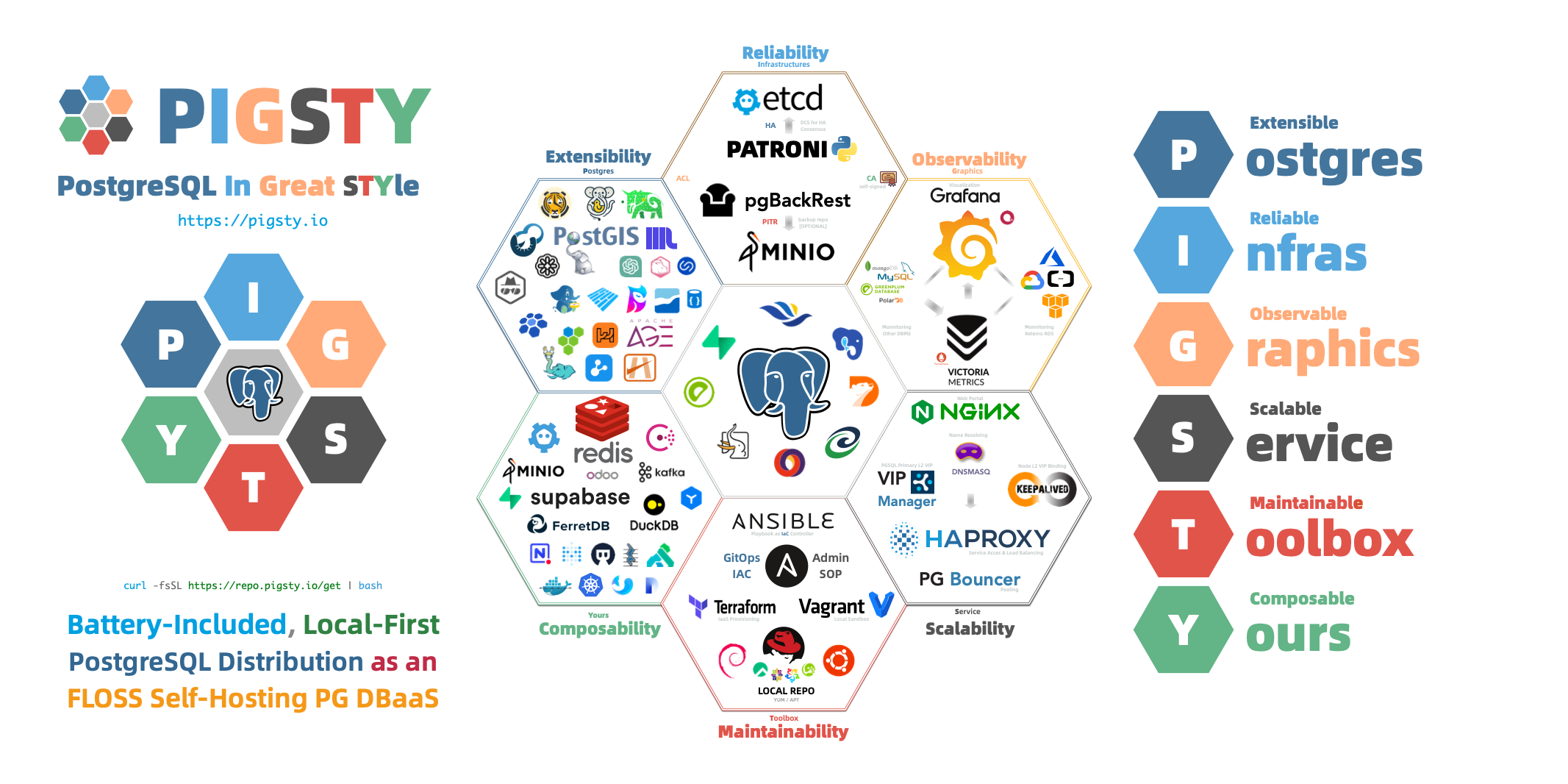
Pigsty scales from laptop to datacenter. Enterprise-grade. Developer-friendly. Get Started with the latest v4.2.0:
curl -fsSL https://repo.pigsty.io/get | bash -s v4.3.0
Features
- Extensible: 510 PG Extensions & 12 PG Kernels available, Packed for 14 Linux Platforms, Battery-Included.
- Reliable: Self-healing HA clusters with pre-configured PITR and built-in ACL, CA & SSL secure best practice.
- Observable: SOTA monitoring for PG / Infra / Node based on the Victoria & Grafana stack: Demo & Gallery.
- Scalable: Auto-routed & pooled customizable database Services Access with haproxy, pgbouncer, and VIP.
- Maintainable: One-Cmd Deploy, Admin SOP, Auto-Tune, Local Repo, IaC and Vagrant / Terraform support.
- Composable: Bonus Modules such as Redis, MinIO, Etcd, Docker, DuckDB, FerretDB, Supabase, & More.
- Controllable: Self-sufficient Infra Closure, Cloud Neutral FOSS. Run on bare Linux without Docker & K8S.
- Affordable: Self-Hosting like a Pro, without the cost of RDS. Empowering Cloud-Exit for Ultra Cost Saving!
You can even use many exotic PG Kernel Forks as in-place replacement and wrap it as a full RDS service:











| Kernel | Key Feature | Description |
|---|---|---|
| PostgreSQL | Battery-Included | Original PGDG PostgreSQL with 460+ extensions |
| Supabase | Backend as Service | BaaS over PostgreSQL, Firebase alternative |
| Citus | Horizontal Scaling | Distributive PostgreSQL via native extension |
| Babelfish | SQL Server Simulation | Microsoft SQL Server wire-compatibility |
| IvorySQL | Oracle Simulation | Oracle Grammar and PL/SQL compatible |
| OpenHalo | MySQL Simulation | MySQL wire-protocol compatibility |
| FerretDB | MongoDB Simulation | MongoDB wire-protocol compatibility |
| Percona | Transparent Data Encryption | Percona Distribution with pg_tde |
| OrioleDB | OLTP Optimization Engine | No bloat, No XID Wraparound, S3 Storage |
| PolarDB | Aurora flavor RAC | RAC, China domestic compliance |
| AgensGraph | Graph-Native Database | Transactional graph database based on PostgreSQL |
| pgEdge | Multi-Master Distributive | Geo-Distributive multi-writer Postgres |
| Cloudberry | MPP Data Warehouse | Greenplum 7 Apache OSS Fork |
And gather the synergistic superpowers of all 460+ PostgreSQL Extensions all together:
Get Started







Prepare a fresh x86_64 / aarch64 node runs any compatible Linux OS Distros, then Install Pigsty with:
curl -fsSL https://repo.pigsty.io/get | bash; cd ~/pigsty;
Then configure and run the deploy.yml playbook with an admin user (nopass ssh & sudo):
./configure -g    # generate config and random passwords
./deploy.yml      # deploy everything on current node
Finally, you will get a pigsty singleton node ready, with WebUI on port 80/443 and Postgres on port 5432.
For dev/testing purposes, you can also run Pigsty inside Docker containers: cd docker; make launch
Single-Node Setup | Production Deploy | Offline Install | Minimal Install | Docker Install | Run Supabase
Install with the pig cli
Then you can launch pigsty with pig sty sub command:
curl -fsSL https://repo.pigsty.io/pig | bash # install pig
pig sty init     # install latest pigsty src to ~/pigsty
pig sty conf     # auto-generate pigsty.yml config file
pig sty deploy   # run the deploy.yml playbook
Install with get script
[root@pg-meta ~]# curl -fsSL https://repo.pigsty.io/get | bash -s v4.2.0
[v4.2.0] ===========================================
$ curl -fsSL https://repo.pigsty.io/get | bash
[Docs] https://pigsty.io/docs
[Demo] https://demo.pigsty.io
[Repo] https://github.com/pgsty/pigsty
[Download] ===========================================
[ OK ] version = v4.2.0 (from arg)
curl -fSL https://repo.pigsty.io/src/pigsty-v4.2.0.tgz -o /tmp/pigsty-v4.2.0.tgz
######################################################################## 100.0%
[ OK ] md5sums = 53cb5980f9XXXXX1fbb832d7ee2fc93a  /tmp/pigsty-v4.2.0.tgz
[Install] ===========================================
[WARN] os user = root , it's recommended to use a non-root sudo-able admin
[ OK ] install = /root/pigsty, from /tmp/pigsty-v4.2.0.tgz

[Bootstrap] ===========================================
[WARN] ansible = not found, bootstrap
bootstrap pigsty v4.2.0 begin
[ OK ] region = china
[ OK ] kernel  = Linux
[ OK ] machine = x86_64
[ OK ] package = rpm,dnf
[ OK ] vendor = rocky (Rocky Linux)
[ OK ] version = 10 (10.0)
[ OK ] sudo = root ok
[WARN] ssh = [email protected] fixed
[WARN] old repos = moved to /etc/yum.repos.d/backup
[ OK ] repo file = add el10.x86_64 china upstream
[WARN] rpm cache = updating, may take a while
Pigsty PGSQL 10 - x86_64                                                                                                                                                                                      364 kB/s | 251 kB     00:00
EL 10 BaseOS 10 - x86_64                                                                                                                                                                                       32 MB/s | 6.4 MB     00:00
EL 10 AppStream 10 - x86_64                                                                                                                                                                                    11 MB/s | 2.1 MB     00:00
EL 10 CRB 10 - x86_64                                                                                                                                                                                         1.8 MB/s | 492 kB     00:00
EL 10 EPEL 10.0 - x86_64                                                                                                                                                                                       27 MB/s | 4.8 MB     00:00
Metadata cache created.
[ OK ] repo cache = created
[ OK ] install el10 utils
Last metadata expiration check: 0:00:02 ago on Wed 07 Jan 2026 05:58:22 PM CST.
.....

Installed:
  ansible-2.16.14-1.el10.noarch             ansible-collection-ansible-posix-2.0.0-1.el10_0.noarch      ansible-collection-community-crypto-2.15.0-1PIGSTY.el10.noarch      ansible-collection-community-general-10.2.0-1.el10_0.noarch
  ansible-core-1:2.16.14-1.el10.noarch      git-core-2.47.3-1.el10.x86_64                               python3-cffi-1.16.0-7.el10.x86_64                                   python3-cryptography-43.0.0-4.el10.x86_64
  python3-jmespath-1.0.1-8.el10.noarch      python3-ply-3.11-25.el10.noarch                             python3-pycparser-2.20-16.el10.noarch                               python3-resolvelib-1.0.1-6.el10.noarch

Complete!
[ OK ] ansible = ansible [core 2.16.14]
[ OK ] boostrap pigsty complete
proceed with ./configure
HINT: To install a specific version, pass the version string as the first parameter:
curl -fsSL https://repo.pigsty.io/get | bash -s v4.2.0
Clone src with git
You can also download the pigsty source with git, remember to check out a specific version tag, the main branch is for development.
git clone https://github.com/pgsty/pigsty; cd pigsty; git checkout v4.2.0
Architecture
Pigsty uses a modular design: you can use one or all, with best-of-breed products integrated as a platform.



You can compose them freely in a declarative manner. INFRA & NODE will suffice for host monitoring.
ETCD and PGSQL are used for HA PG clusters; installing them on multiple nodes automatically forms HA clusters.
The default deploy.yml playbook will deploy INFRA, NODE, ETCD & PGSQL on the current node.
This gives you an out-of-the-box PostgreSQL singleton instance (admin_ip:5432) with everything ready.
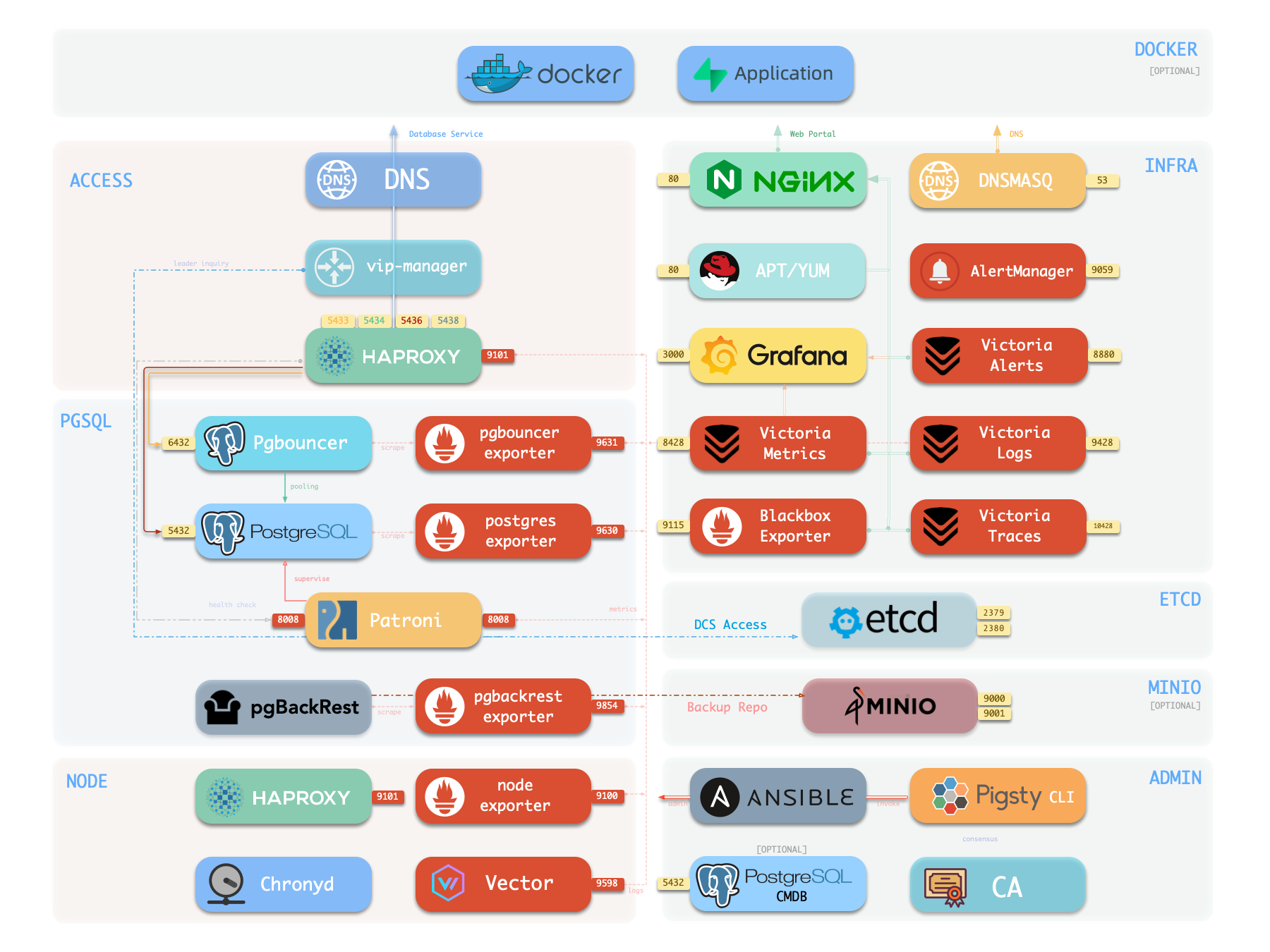
The node can be used as an admin controller to deploy & monitor more nodes & clusters. For example, you can install these 6 OPTIONAL extra modules for advanced use cases:

PGSQL.


Of course, you can deploy different kinds of HA PostgreSQL clusters on multiple nodes, as much as you want.
License
Pigsty is licensed under Apache-2.0. Check Docs for details.
About









-red?logo=c&color=steelblue)


Tag summary
Content type
Image
Digest
sha256:08f039c99…
Size
281.7 MB
Last updated
about 1 month ago
docker pull pgsty/pigsty